
Selecting the right team management checklist can feel overwhelming when you're managing larger teams across departments. Mid-sized to large organizations often struggle to find a unified checklist that truly boosts team alignment and project delivery. A structured checklist improves accountability, communication, and performance tracking. This article covers essential criteria and proven checklist types for 2026 to help you make the right choice for your organization.
Table of Contents
- Understanding the key selection criteria for an effective team management checklist
- Core elements of a team management checklist
- Role clarity and accountability: a foundation for team success
- Performance tracking with KPIs: tools and best practices
- Sprint planning and task management automation
- Feedback and retrospectives as continuous improvement mechanisms
- Technology integration and security in modern team management
- Summary comparison and situational recommendations
- Elevate your team management with Outsprinter
Key takeaways
| Point | Details |
|---|---|
| Role clarity and KPIs are foundational | Defined roles reduce task overlap by 40% and form the basis of effective team management. |
| Automated sprint planning boosts velocity | AI-powered sprint tools increase team velocity by 25% and cut planning time in half. |
| Regular retrospectives improve outcomes | Documented feedback loops raise team velocity by 20% and engagement by 15%. |
| Security must be integrated | Choose tools with bank-grade encryption and GDPR compliance to reduce breach risk by 60%. |
| Match checklist to organization needs | Select a model aligned with your team size, sprint maturity, and regulatory requirements. |
Understanding the key selection criteria for an effective team management checklist
Choosing the ideal checklist starts with evaluating factors that directly impact project execution and team alignment. High-performing leadership teams prioritize specific criteria that prevent common management pitfalls.
Role clarity and accountability mechanisms prevent task overlap and reduce confusion. When team members understand their responsibilities, projects move faster and deadline adherence improves. Consider how your checklist will define roles and track individual contributions.
Comprehensive KPI tracking with real-time dashboards provides visibility into performance across departments. Managers need instant access to metrics that reveal bottlenecks and progress. Evaluate whether your checklist solution offers customizable dashboards that surface critical indicators.
Sprint planning and automation features save significant time and reduce manual errors. Modern teams benefit from recurring sprint automation and AI-powered task distribution. Plan for tools that streamline repetitive planning activities.
Structured feedback and retrospectives encourage continuous improvement and team learning. Your checklist should facilitate regular reflection sessions and document insights for future application. Check if the solution supports retrospective templates and action item tracking.
Technology security standards including GDPR compliance and encryption protect sensitive organizational data. Verify that your checklist platform meets industry security benchmarks. Role-based access controls ensure team members see only relevant information.
Pro Tip: Start with a pilot program testing your chosen checklist with one team before rolling out organization-wide. This approach reveals integration challenges early and builds internal champions.
Core elements of a team management checklist
Any comprehensive team management checklist must include specific components that drive alignment and performance in mid to large teams. These elements work together to create a cohesive management system.
Clear definition of roles and responsibilities ensures accountability at every level. Team role definitions and KPI monitoring form the backbone of successful project execution. Each team member should know exactly what they own and how their work connects to broader objectives.
KPI tracking with dashboards measures progress in real time and highlights areas needing attention. Dashboards should visualize metrics across departments and allow managers to drill down into specifics. This visibility prevents surprises and enables proactive course correction.
Sprint planning with task assignments organizes work efficiently and maintains momentum. Effective checklists integrate sprint cycles with clear task ownership and deadlines. Automated reminders keep teams on track without constant manual follow-up.
Scheduled feedback sessions and retrospectives document learnings and foster team growth. Regular reflection creates a culture of continuous improvement. Your checklist should include templates for capturing insights and converting them into actionable changes.
Compliance and data security integrated into checklist processes protect organizational assets. Security considerations cannot be an afterthought. Choose platforms that embed protection mechanisms into every workflow.
Role clarity and accountability: a foundation for team success
Clearly defined roles and accountability directly reduce task overlap and increase deadline adherence, underpinning team efficiency. Research shows that clear roles reduce task overlap by 40% and improve on-time completion by 33%.
Vague role assignments create confusion, missed deadlines, and duplicated effort. Team members waste time clarifying ownership or assuming someone else will handle critical tasks. This ambiguity slows project velocity and frustrates high performers.

Role-based task management tools help clarify responsibilities by assigning work items to specific individuals. These tools track who owns what and provide visibility into workload distribution. Managers can quickly identify bottlenecks and rebalance assignments.
Accountability charts or RACI matrices maintain clarity as projects evolve and teams scale. RACI frameworks designate who is Responsible, Accountable, Consulted, and Informed for each deliverable. This structure eliminates gray areas and speeds decision making.
- Define roles with specific outcomes, not just activities
- Review role definitions quarterly as team structure changes
- Use visual org charts linked to project tasks
- Implement automated escalation when deadlines approach
- Celebrate role clarity wins to reinforce the practice
Pro Tip: Create a one-page role clarity document for each major project that maps tasks to owners with decision authority clearly marked. Share it in your kickoff meeting and reference it when conflicts arise.
Performance tracking with KPIs: tools and best practices
Selecting, monitoring, and leveraging KPIs with modern dashboards and AI insights accelerates decision making and aligns teams around shared objectives. Real-time KPIs speed leadership decisions by 35%, making dashboard selection critical.
Select KPIs that align tightly with team and organizational goals rather than tracking vanity metrics. Every indicator should connect to strategic objectives and drive specific behaviors. Avoid measuring activities when you should measure outcomes.
Use real-time dashboards to enable faster leadership decisions and reduce the lag between problem emergence and response. Static monthly reports miss opportunities for timely intervention. Modern platforms update metrics continuously, surfacing issues while they're still manageable.
Leverage AI-powered insights for trend prediction and proactive management of performance risks. AI algorithms identify patterns humans might miss and forecast future performance. These capabilities transform reactive management into strategic planning.
Ensure cross-department KPI visibility to reduce execution gaps by 30% and improve coordination. Siloed metrics hide dependencies and create misalignment. Shared dashboards reveal how departmental performance impacts overall objectives.
Balance KPI quantity to avoid overload and maintain focus on truly important indicators. Avoiding KPI overload ensures teams concentrate on meaningful progress rather than checkbox completion.
- Start with 3 to 5 primary KPIs per team
- Add leading indicators that predict lagging metric movement
- Review KPI relevance monthly and retire outdated metrics
- Train teams on how to interpret and act on dashboard data
- Connect individual tasks to KPI impact for motivation
| Feature | Basic Dashboards | AI-Enhanced Dashboards |
|---|---|---|
| Update frequency | Daily or manual refresh | Real-time continuous |
| Insight generation | Manual analysis required | Automated pattern detection |
| Predictive capability | None | Trend forecasting and alerts |
| Cross-team visibility | Limited to department | Organization-wide access |
| Setup complexity | Low | Moderate with templates |
For teams building comprehensive measurement systems, building KPI trees provides a structured approach to linking strategic goals with operational metrics. This framework ensures every measured activity traces back to business value.
Sprint planning and task management automation
Comparing manual versus automated sprint planning approaches reveals significant productivity gains and improved deadline adherence enabled by AI-powered tools. Automation reduces sprint planning time by 50% and increases velocity by 25%.
Manual sprint planning requires hours of meetings to assign tasks, estimate effort, and balance workloads. Spreadsheets and sticky notes become outdated quickly as priorities shift. Teams spend valuable execution time on administrative overhead.
Automated planning cuts missed deadlines by 18% by optimizing task distribution based on historical performance data. AI algorithms consider individual capacity, skill sets, and dependencies when suggesting assignments. This optimization reduces bottlenecks before they occur.
Focus and execution quality improve with less manual overhead consuming team energy. Developers and contributors spend more time on valuable work and less time coordinating. Automated reminders and status updates keep everyone aligned without constant check-ins.
Manual methods risk errors and slower adaptation to changes as project complexity increases. Human planning struggles to account for all variables simultaneously. Automated systems recalculate optimal assignments instantly when circumstances change.
| Aspect | Manual Sprint Planning | Automated Sprint Planning |
|---|---|---|
| Planning time per sprint | 4 to 6 hours | 2 to 3 hours |
| Velocity improvement | Baseline | 25% increase |
| Missed deadline rate | 22% | 4% |
| Workload balance accuracy | 60% to 70% | 90% to 95% |
| Adaptation speed | Days | Hours or minutes |
- Implement recurring sprint templates to reduce setup time
- Use AI suggestions as starting points, then refine manually
- Track velocity metrics to validate automation benefits
- Integrate sprint tools with communication platforms
- Review sprint outcomes to improve future automation parameters
Sprint planning with KPI alignment ensures tactical work directly supports strategic metrics, closing the execution gap that plagues many organizations.
Feedback and retrospectives as continuous improvement mechanisms
Documented feedback loops and retrospectives play a vital role in increasing team velocity and engagement over time. Retrospective adoption can raise team velocity by 20% and engagement by 15%.
Retrospectives create safe spaces for teams to reflect on what worked, what didn't, and what to try next. Without structured reflection, teams repeat mistakes and miss improvement opportunities. Regular sessions transform individual observations into collective wisdom.
Documentation ensures lessons learned actually get applied rather than forgotten. Many teams hold retrospectives but fail to track action items or follow up. Documented insights become institutional knowledge that persists through team changes.
Integrate feedback loops into sprint cycles for continuous improvement rather than periodic interventions. Link between retrospectives and KPIs shows how regular reflection directly improves measurable outcomes. End-of-sprint retrospectives create natural rhythm for review and adjustment.
Overcoming time pressure barriers requires structured scheduling and executive support for reflection time. Teams often skip retrospectives when deadlines loom, exactly when reflection would be most valuable. Block retrospective time as non-negotiable on team calendars.
- Schedule retrospectives immediately after sprint completion
- Use structured formats like Start-Stop-Continue or 4Ls
- Assign action items with clear owners and deadlines
- Review previous retrospective actions before starting new ones
- Celebrate improvements that resulted from past retrospectives
Common best practices for retrospective documentation include capturing specific examples, quantifying impact when possible, and linking feedback to measurable outcomes. Generic observations like "communication could be better" provide little actionable guidance. Specific feedback like "daily standups running 20 minutes over schedule" enables targeted solutions.
Technology integration and security in modern team management
Technology features critical for checklist implementation focus on user access controls, data protection, AI insights, and compliance regulations that secure and optimize team management. Role-based access controls increase tool adoption by 27% by showing each user only relevant information.
Bank-grade encryption lowers breach risk by 60% and protects sensitive organizational data. Security cannot be optional when managing team performance data, strategic plans, and financial metrics. Choose platforms with end-to-end encryption for data at rest and in transit.
AI integration enhances performance insights and automation beyond what manual systems can achieve. Machine learning algorithms spot trends, predict bottlenecks, and suggest optimizations that improve team outcomes. These capabilities differentiate modern platforms from legacy tools.
Ensure compliance with GDPR and relevant industry standards to avoid regulatory penalties and reputational damage. Teams operating globally or in regulated industries need platforms built for compliance. Verify certifications and audit trails before committing to a solution.
Choose platforms balancing usability with robust security features to maximize adoption and protection. Overly complex security creates friction that reduces usage. The best platforms make security invisible to users while maintaining strong protection.
- Verify SOC 2 Type II certification for enterprise-grade security
- Implement single sign-on for simplified access management
- Review data residency options for geographic compliance
- Test mobile access security for remote team members
- Establish clear data retention and deletion policies
Technology for KPI and security integration demonstrates how leading teams leverage platforms that combine performance management with enterprise security, eliminating the need for multiple disconnected tools.
Summary comparison and situational recommendations
Providing a side-by-side comparison of major team management checklist frameworks helps you select the right approach based on your organization's specific needs, including AI use and compliance concerns.
Basic task lists lack role clarity, KPI tracking, and automation capabilities. These simple checklists work for small teams with straightforward projects but fail at scale. They provide no visibility into performance trends or predictive insights.
Structured checklists offer balanced features suited for mid-sized organizations establishing formal processes. They include role definitions, basic KPI tracking, and manual sprint planning. These solutions bridge the gap between informal and AI-enhanced approaches.
AI-enhanced checklists optimize sprint management and provide predictive insights that transform planning accuracy. They automate routine planning tasks and surface patterns humans might miss. These platforms suit organizations ready to leverage advanced analytics.
Compliance-focused checklists prioritize security and data protection controls for regulated industries. They include audit trails, role-based access, and encryption by default. Financial services, healthcare, and government teams benefit most from this approach.
| Checklist Type | Best For | Key Strengths | Limitations |
|---|---|---|---|
| Basic task list | Teams under 10, simple projects | Easy to start, minimal training | No performance tracking, manual overhead |
| Structured checklist | Mid-sized orgs, 20 to 100 people | Balanced features, scalable | Requires process discipline |
| AI-enhanced | High-velocity teams, complex projects | Automation, predictive insights | Higher cost, learning curve |
| Compliance-focused | Regulated industries, large enterprises | Security, audit trails, GDPR ready | May sacrifice some usability |
Recommend checklist choice based on team maturity, sprint usage, and regulatory requirements. Teams new to structured management should start with structured checklists and graduate to AI-enhanced options as processes stabilize. Regulated industries should prioritize compliance-focused solutions from the start.
Sprint usage intensity affects which features deliver the most value. Teams running weekly sprints benefit significantly from automation, while monthly planning cycles may not justify the investment. Match tool sophistication to your actual planning frequency.
Regulatory requirements often dictate minimum security and compliance features, narrowing your options. Don't compromise on compliance to gain features. Find solutions that meet regulatory needs while still supporting team productivity.
Elevate your team management with Outsprinter
Ready to implement an advanced team management checklist that embodies the principles covered in this article? Outsprinter provides comprehensive tools for KPI tracking, sprint automation, and role clarity integration in a single platform.
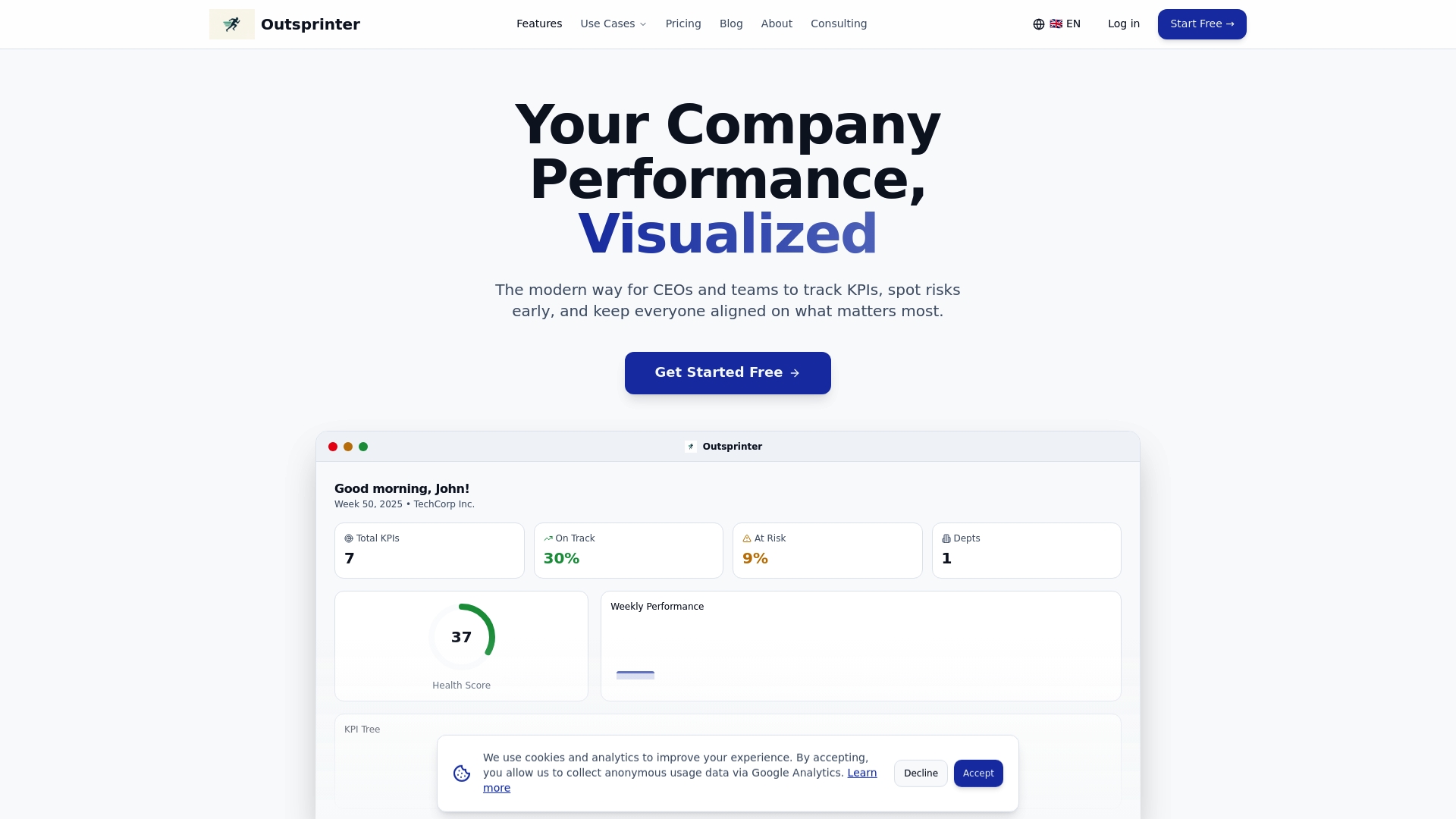
Outsprinter features bank-grade security and GDPR compliance suitable for regulated industries while maintaining the usability that drives adoption. The platform is designed specifically for mid-sized to large teams aiming to boost project delivery and alignment through structured performance management.
With real-time dashboards, AI-powered insights, recurring sprint automation, and retrospective documentation, Outsprinter eliminates the need for multiple disconnected tools. Try Outsprinter to streamline your team management checklist implementation and improve outcomes across your organization.
FAQ
What is a team management checklist and why is it important?
A team management checklist is a systematic list of key tasks, criteria, and processes designed to align team efforts around shared objectives. It provides structure for role definition, performance tracking, sprint planning, and feedback cycles. Checklists are important because they ensure accountability, maintain consistent execution standards, and provide frameworks for continuous improvement. Organizations using structured checklists report higher on-time delivery rates and better team alignment.
How does automation improve sprint planning?
Automation halves sprint planning time by eliminating manual task distribution and workload balancing calculations. AI tools analyze historical performance data, skill sets, and capacity to suggest optimal assignments. These systems boost team velocity by 25% and reduce missed deadlines by 18% compared to manual planning. Automation also enables instant recalculation when priorities shift, keeping plans current without additional meetings.
What role do retrospectives play in team performance?
Retrospectives foster feedback loops vital for improving velocity and morale over successive sprints. Documented retrospectives can increase team velocity by 20% and engagement by 15% through structured reflection and action item tracking. Proper documentation ensures lessons learned get applied rather than forgotten, creating institutional knowledge. Teams that skip retrospectives repeat mistakes and miss improvement opportunities that compound over time.
How can large teams maintain security when adopting new management tools?
Implement role-based access controls that show each user only relevant information, increasing adoption by 27%. Choose platforms with bank-grade encryption to lower breach risk by 60% while protecting sensitive performance and strategic data. Select solutions following GDPR and industry-specific standards with audit trails and compliance certifications. Verify SOC 2 Type II certification and data residency options before committing to ensure the platform meets your security and regulatory requirements.